
01 Project Overview
Atomic City was an India-based games studio owned by the company I worked for. Both studios produced slot games released under the Atomic City brand, but differences in their interfaces and overall quality were becoming apparent to casino operators. Games released under the same brand could offer noticeably different experiences depending on which studio had developed them.
Having previously designed the shared UI for our own slot games, I was tasked with redesigning Atomic City's interface as part of a wider effort to improve quality and consistency across the brand.
The existing interface also limited the types of games the studio wanted to produce, particularly on mobile, where controls and information became difficult to read or interact with.
To establish the requirements, I organised a FigJam workshop with game designers and senior stakeholders. Together, we reviewed the existing interface, analysed competitor products and mapped out the features the redesigned UI would need to support.
This helped establish priorities around usability, mobile ergonomics, visual clarity and flexibility across different slot titles.

Figjam Workshop Board
02 Redesigning the Game Interface

Original UI
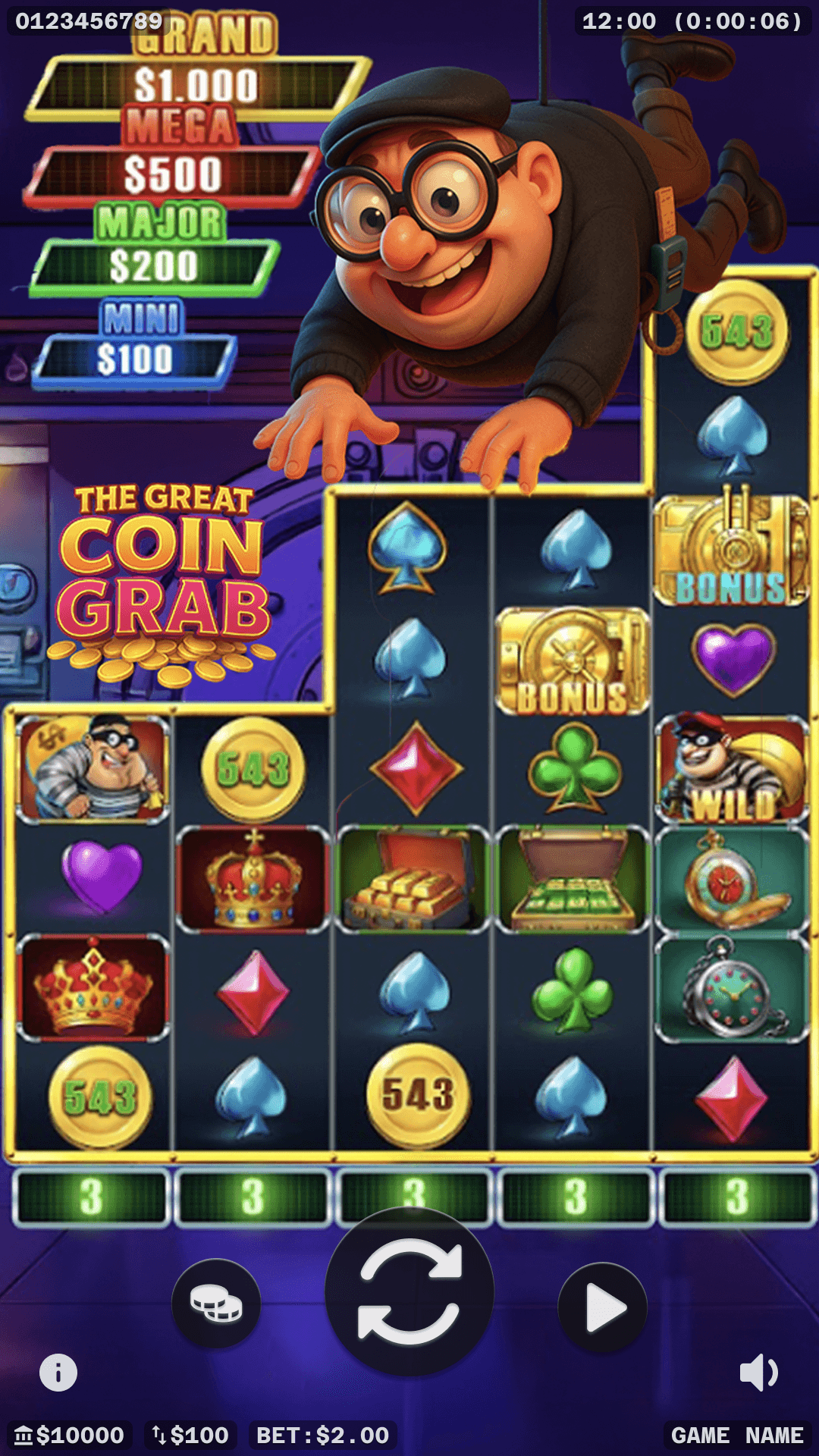
Proposed Redesign (placeholder game art)
The redesign focused on simplifying the interface, improving readability and making frequently used controls easier to access, while freeing up more space for the game itself.
Simplifying the Layout
I consolidated the account balance and bet information into a single bar along the bottom of the screen, replacing the oversized containers used previously.
I also repositioned the three primary controls: bet, spin and autoplay, into a central horizontal arrangement, improving their accessibility and reducing the likelihood of accidental inputs.
The bet and spin icons were also redesigned to provide greater clarity and consistency across the different games.

Consistent Controls
Rethinking Spin Controls
The brief called for three different spin speeds, but introducing additional controls risked adding further clutter to the interface.
I proposed consolidating these interactions into the existing spin button:
Tap: Start a regular spin.
Tap during a spin: Skip to the result.
Hold: Activate turbo for faster spins.

Competitor’s Turbo button (3 way toggle)

Gesture based approach
During autoplay, the button would instead act as a speed selector, allowing players to adjust the pace without interrupting play.
To help communicate the gesture, I also designed a contextual “Hold for turbo” message that would appear while the game was idle (player not actively spinning), keeping the button itself free of additional text. Splitting the text out into a scalable box also helps with internationalisation, as fitting longer translated text into the circular button could be difficult.
Having observed that some mobile players prefer to listen to music, podcasts or other media while playing, I moved the music mute control onto the main interface, allowing them to quickly silence the game without navigating through a menu.

Speed controls in autoplay

Turbo notification
03 Simplifying the User Journey
The original bet and autoplay windows used small buttons that made accurate selection difficult on mobile devices. Their limited space also struggled to accommodate currencies with longer numerical values, often requiring the text to be reduced in size.
I redesigned both as full-screen interfaces, with larger, bottom-aligned options to improve touch accuracy, readability and reachability.
Reducing Unnecessary Steps

Original Autoplay Window
In the original bet interface, players had to select an amount and then confirm their choice. I proposed removing the additional confirmation step, allowing a selection to immediately update the bet and dismiss the window.
I applied the same principle to autoplay, proposing that selecting the number of spins would immediately begin the sequence without requiring a separate confirmation.
Through observation and my own experience, I'd noticed that players could easily overlook a required selection, leaving the OK button disabled without an obvious explanation. Although resolving this might only take a moment from the user's perspective, it introduced unnecessary friction and interrupted the flow of an otherwise simple interaction.
To remedy this, I simplified the loss-limit controls. Rather than requiring players to explicitly select an amount or an unlimited option, I proposed a toggle that would enable a loss limit when required, with 'unlimited' as the assumed default if no option was selected.
Together, these changes aimed to reduce unnecessary decisions and interactions, making it quicker and easier for players to return to gameplay.

Proposed Bet Window

Proposed Autoplay Window
04 Project Outcome
The project remained at the design stage following the closure of Atomic City, before I had the opportunity to fully explore the landscape and desktop layouts or see the proposed interface implemented.
Although I wasn't able to validate the redesign in production, some of the interaction patterns and design thinking informed my subsequent work on 99 Royale, particularly around mobile controls and simplifying the player experience.
Stills


Alternative Autoplay Speed explorations

Alternative Bet Window, this style was later adopted into the 99 Royale Project
