01 Project Overview
99 Royale Promo Trailer, produced and animated by me
99 Royale is a browser-based multiplayer slots experience that brings players from different slot titles together into a shared battle. Each title retains its own theme and slot gameplay while sharing the same multiplayer interface, controls and mechanics.
Slot wins generate attack power, which players can store and use to attack opponents, stealing their health. With up to 99 players competing in a single battle, the ultimate goal is to be the last player standing and claim the Battle Prize.


Gameplay Loop
As Product Design Lead, I took ownership of the multiplayer UX/UI, visual design and animations from early prototypes through to the final product. Alongside hands-on design work, I provided design direction and approvals, working closely with the producer and development team to guide implementation. I also created and maintained the project's central design specification, documenting its interface and interactions, while contributing to the wider game design and UX of the individual slot titles.


The three launch titles for 99 Royale, each featuring the same multiplayer interface.
02 Starting Again
The original concept and underlying mathematical mechanics of 99 Royale were developed by the company's CEO, with an initial version of the game already in production. My involvement at this stage was relatively limited, but as development progressed, the project began to lose momentum. Without a clear vision of what the finished experience should be, development was becoming increasingly directionless.
The existing interface was overcrowded, the mechanics were confusing and, most importantly, we hadn't established whether the core gameplay was actually fun.

Original Design before I took ownership
When the decision was made to revisit the project, I took on the role of Lead UX/UI Designer. Asked for my thoughts on how we should move forward, I proposed starting afresh with a small, agile team focused on finding the fun before committing to full production.
Starting Small
The original project had moved directly into production, with features being developed through a traditional development process while the gameplay was still being figured out.
I wanted to take a different approach: fail fast, iterate often, testing ideas before investing heavily in their implementation.
Working with two developers, the CEO and a producer, we built a lightweight prototype in React, stripping the game back to its most basic elements. There wasn't even a slot at this stage, just a button that produced a win or lose result, opponents represented by health bars and the core battle mechanics.

Initial React Prototype
This allowed us to experiment rapidly. Ideas could be sketched out in Figma, implemented in the prototype and ready to test as early as the following day.
Finding The Fun
to some designers, game feel is all about appeal. It’s all about layering on effect after careful effect, polishing every interaction—no matter how trivial— until interacting with the game has a foundation of aesthetic pleasure.
Steve Swink - Game Feel
Inspired by Steve Swink's book: Game Feel and the concept of game juice popularised by developer Vlambeer, we explored how responsiveness, feedback and greater player control could make the experience more engaging.
One of the biggest limitations of the original game was the lack of player agency. Winning a spin automatically triggered an attack, leaving players with little control beyond choosing their target.
I proposed introducing a dedicated Fire button and the ability to store power earned through wins. Rather than attacking automatically, players could now accumulate power and choose when to use it, introducing an element of timing, strategy and player choice.
We regularly tested the prototype with colleagues and people unfamiliar with the game, using their feedback to explore and refine the mechanics before progressing towards full scale development.

Playtests Catalogued in Dovetail
03 Making 99 Players Readable
One of the biggest UX challenges was finding a way to represent up to 98 opponents on a mobile screen, without overwhelming the player or interfering with the slot game itself.
The original design featured miniature versions of every opponent's slot machine. While this provided a visual representation of the other players, it resulted in an overcrowded interface, leaving little room for the individual slot titles and their themes.
I began exploring a more abstract approach, replacing the miniature slots with simple circles representing each opponent. This would free up valuable screen space while still allowing players to see the state of the battle at a glance.


v1 layout vs the circle based approach
Communicating Health Through Colour

Initial Colour Concept
With players constantly gaining and losing health, we needed a way to communicate their relative strength without displaying 98 individual health bars.
I initially explored a nine-colour gradient, ranging from purple for exceptionally strong players through to red for those approaching elimination. However, distinguishing between so many colours made it difficult to interpret the information quickly.
We eventually simplified this into three health categories, or health buckets: green for healthy players, yellow for weakened players and red for those close to elimination.
Because attacking opponents allowed players to accumulate increasingly large amounts of health, fixed health thresholds wouldn't be particularly useful. Instead, the categories were based on each player's health relative to the average across the battle, allowing the system to adapt as players grew stronger.

Giving Opponents an Identity
Although representing opponents as simple coloured circles reduced visual clutter, it also made individual players difficult to distinguish.
Building on an earlier idea of representing each slot title with its own character, I explored incorporating small character avatars into the player icons.
With 98 opponents competing for limited screen space, making these avatars recognisable presented another challenge. I experimented with different shapes and arrangements, eventually exploring hexagons as a more space-efficient alternative to circles.
The hexagonal layout became known internally as the Hive, inspired by the honeycomb-like arrangement of the player icons.
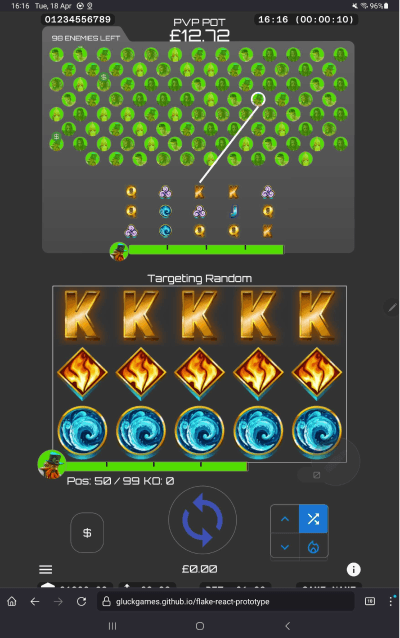

Hexagons are the bestagons!
The Hive displayed every player in the battle, while a separate miniature slot display beneath it showed the currently targeted opponent or opponents. Highlighting those players within the Hive helped connect the two representations, providing context for who the player was attacking.
I also introduced a magnification effect to make the small avatars easier to recognise, helping players identify their targets within the wider battle.
Concepts I created for the hive magnification effect
Together, these solutions allowed us to represent all 98 opponents within a compact interface, communicating their identity and relative health while preserving valuable screen space for the slot game.
The Hive also needed to accommodate battles of different sizes, so I developed a series of responsive layouts that adjusted to the number of participating players while maintaining a balanced arrangement. These filled up in a specific order to maintain the most aesthetically pleasing arrangement at the start of the battle.

Hive 'breakpoints'
04 Making Complex Mechanics Understandable
99 Royale featured a number of interconnected systems governing targeting, health, eliminations and player progression. Translating these into an intuitive interface, while working within the constraints of a mobile screen, presented several unique UX challenges.
Targeting Opponents
Early targeting modes used thematic names such as Hero, Vendetta and Sniper, but these proved difficult to understand. I advocated for descriptive alternatives such as Target Weakest and Target Attackers, prioritising clarity over thematic language.
I also developed a series of adaptive layouts to accommodate between one and eight targeted opponents within the limited available space.


A small selection of the many targeting interfaces we tried.
Introducing Slotmoji


Original slot artwork alongside its simplified Slotmoji representation
Representing an opponent's slot at a miniature scale was difficult, as detailed slot artwork became illegible when reduced in size.
My solution was Slotmoji, a shared library of over 700 simplified, emoji-like symbols used in place of the original slot artwork on the enemy slots. The icons were packaged as a font for efficient rendering, recolouring and distribution across different slot titles.
To make the library easier to navigate, I also developed a Figma plugin for assigning searchable keywords to individual icons.

A subset of the slotmoji library along with the tagging plugin
Visualising Health

Players started with 1,000 health but could accumulate up to 99,000 by attacking opponents and stealing theirs.
Inspired by League of Legends, we developed a segmented health bar that dynamically adjusted its scale as players gained health. Despite the underlying complexity, with some additional animation, testing suggested that players understood its behaviour intuitively.
We also used the same relative health bucket colours as the Hive to maintain consistency across the interface.
Early motion studies of the health bar scaling system.
05 From Prototype to Production
As 99 Royale moved from prototyping into full production, my role extended beyond designing the interface to directing its implementation, reviewing work and collaborating with developers and technical artists to bring the experience together.
Establishing a Visual Production Pipeline
Early in development, I advocated for a more visual, hands-on production workflow that would give technical artists and me greater control over the game without relying on developers to implement every visual change.
I proposed using Godot as a visual editor, creating early animation experiments to demonstrate its potential. The development and technical art teams subsequently built a pipeline that allowed the game's visual front end, including scene hierarchies and animation timelines, to be authored in Godot and exported to our Pixi.js-based engine.
This reduced the need for developers to manually translate designs and animation references into the game, giving the creative team more direct control over the finished experience.

One of the slot titles viewed in our Godot editor.
Design System & Documentation
I created and maintained the Product Bible, a comprehensive Figma document that served as the project's single source of truth.
The game interface was rendered using Pixi.js and HTML Canvas, while elements such as modals and game rules used HTML. The document combined a design system for these HTML elements, using Figma components, variables and design tokens, with detailed specifications for the canvas-rendered interface, documenting its visual design, states, interactions and behaviours.
With the multiplayer UI needing to accommodate different slot titles, player counts and constantly changing game states, the document provided a shared reference for the team throughout development.
Each feature was documented on a dedicated Figma page, with reference codes linking the designs to development tasks.
Bringing the Interface to Life
Alongside directing the implementation of the interface, I produced final UI artwork and animations, refining the visual feedback and interactions as the game developed.
I also created promotional videos and marketing assets, including animated phone mockups showcasing the finished game in action.
Menu & Navigation Design
KO & End of Battle Animations
06 Reflections
One aspect I would have liked to approach differently was user testing during production. While regular testing was central to our early prototyping process, I wasn't given the resources to continue this approach as the product developed.
Given the complexity of the game, I believe continued testing with new players would have been particularly valuable in identifying usability issues and validating design decisions before release.
It's something I'd prioritise on future projects, ensuring that user testing remains part of the development process rather than being concentrated in the initial prototyping phase.